Simple to use! - Simply Powerful!



Grocery-Tracker
In order to share data between phones, one must be the Primary device and all others Secondary devices. These are not fields within Grocery-Tracker, but are concepts. Only one phone can maintain the base data. The others will only have copies. text.
There are actually 2 different ways to share some data. Both methods allow you to share both Product and Inventory data.
- Using the same name on both devices.
- Register both phones using the same Customer ID, Password and Customer Name using the "More >
Maintenance > User Profile" screen.
- On the Primary phone, go to "More > Maintenance > Backup/Restore" and backup both Products
and Inventory.
- On the Secondary phone, go to "More > Maintenance > Backup/Restore" and Restore both Products and Inventory.
- Select
"Replace" when prompted and the system will replace the current data with the saved data from the primary phone.
- Using different names on both devices (also allows shopping lists to be shared)
- Register each phone with different Customer information
as in step 1 above.
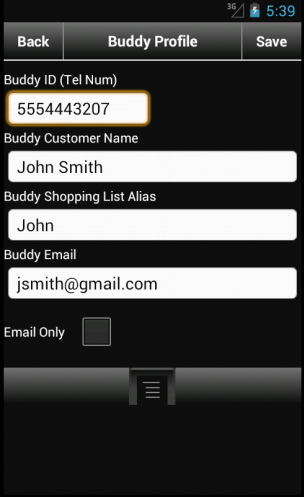
- On the Secondary phone, create a Buddy record. Go to "More > Maintenance > Sharing > Setup Buddy(s)"
- On
the Primary phone, go to "More > Maintenance > Backup/Restore" and backup both Products and Inventory.
- On the Secondary phone,
go to "More > Sharing > Load Buddy(s) Products" and Restore both Products and Inventory.
- Select "Replace" when prompted and the
system will replace the current data with the saved data from the primary phone.


User Profile Phone 1
Buddy Profile Phone 1


User Profile Phone 2
Buddy Profile Phone 2
Steps to sharing data.
In order to share data, you are actually backing up that data to the web. Then, you can restore the data to
a 2nd device.
To restore data, if on same device or same login, use the same steps as above, but select "Restore" instead of "Backup".


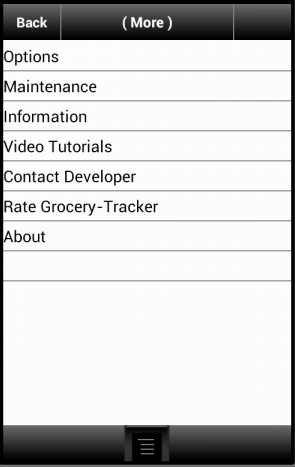
More Screen
Maintenance Screen
Backup/Restore Screen
- Got to the "More" tab and select "Maintenance".
- Select "Backup/Restore"
- Tap "Backup Products" to backup your product data.
- Tap "Backup
Inventory" to backup your inventory data.